
Test Copy
https://www.hung.pro.vn/2025/12/tao-link-nguon-bai-viet-su-dung-lien-ket-dinh-kem-trong-blogspot.html
[Visual Basic] MathML to/from Plain Text Converter
Hi mọi người, tìm hiểu code trên codeproject.com thấy có bài hướng dẫn chuyển đổi dạng HTML
Chuyển đổi chuỗi mã hóa MathML thành/từ chuỗi văn bản thuần túy
Mã bao gồm hai lớp để phân tích chuỗi
MathML. Lớp đầu tiên, MathToString chuẩn bị chuỗi. Lớp thứ hai, ParseML, thực hiện phân tích. Tương tự, để lấy mã MathML từ văn bản, một lớp chuẩn bị và lớp kia thực hiện chuyển đổi.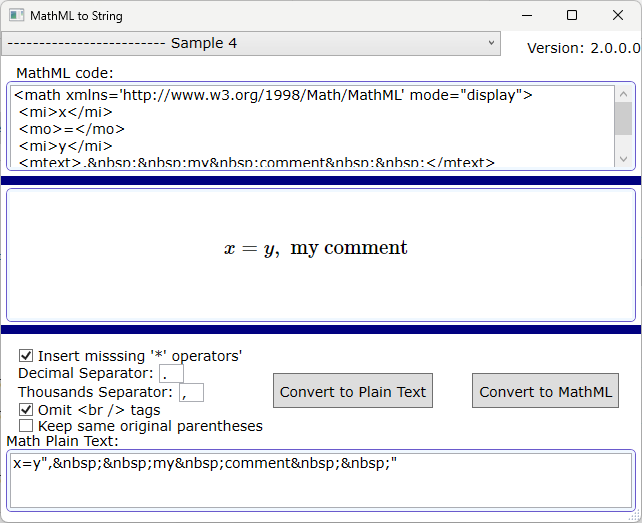
Giới thiệu
Có vẻ như có ít tài nguyên chuyển đổi mã MathML thành văn bản thuần túy. Một lý do chính đáng là không có sự đồng thuận về cách định dạng một số biểu thức toán học. Nhưng đối với nhiều biểu thức liên quan đến toán tử (+,-,/,*,^,=), đây là một trình chuyển đổi khả thi.Các lớp học đã tham gia
LớpMathToString chuẩn bị string mã MathML để class ParseMLcó thể thực hiện phân tích cú pháp chi tiết.
Sự chuẩn bị
Đầu tiên, các khoảng trắng được thay thế bằng các chuỗi rỗng và một số ký tự đặc biệt cũng được thay thế. Ngoài ra, một số thẻ không liên quan đến biểu thức toán học, như stylethẻ, sẽ bị xóa. Sau đó, mã sẽ chuyển từ<mfrac>...</mfrac>,<msup>...</msup>, <mrow>...</mrow>, <msqrt>...</msqrt> các thẻ bên trong nhất sang các thẻ bên ngoài nhất, được phân tích cú pháp và thay thế, bao quanh chúng giữa các ký tự đặc biệt để sau đó chúng có thể được phục hồi theo ParseML lớp.Sử dụng Mã
Để chuyển đổi, chỉ cần gọi phương thức chia sẻMathToString.convertToString():Dim converted as String = MathMLToString.convertToString(MathMLcodeToConvert)
Để chuyển đổi văn bản sang
MathML, hãy gọi convertStringToMathML().Nguyên tắc cơ bản
Phương pháp phân tích cú pháp là phân tích cú pháp đệ quy-giảm dần: Phân tích biểu thức bằng phương pháp giảm dần đệ quy.Phương pháp đánh giá Eyêu Tcầu bất kỳ phép cộng hoặc trừ nào, nhưng Ttrước tiên gọi Fbất kỳ phép nhân hoặc trừ nào, và Ftrước tiên gọi Pbất kỳ phép toán lũy thừa nào có thể. Pgọi trước để lấy mã thông báo tiếp theo. Nếu có (mã thông báo " ", v gọi đệ quy đến T.
E --> T {( "+" | "-" ) T}
T --> F {( "*" | "/" ) F}
F --> P ["^" F]
P --> v | "(" E ")" | "-" T
Phiên bản 1.0.3.0
Bây giờ, tệp zip demo có chứa tệp thiết lập.Các ứng dụng
JavaScript, .NET và Core đã được mã hóa lại, vì MathML là một ứng dụng của XML và để phản ánh các thẻ có thể được lồng nhau 'đệ quy', ý tôi là, một phần tử có thể xuất hiện bên trong chính nó hoặc bất kỳ cấp nào bên dưới các phần tử con của nó. Ví dụ:<mfrac>
<mrow>
<mi>-1</mi>
</mrow>
<mn>
<mn>3</mn>
</mn>
</mfrac>
Phiên bản 2.0.0.0 (2024-03-25)
Mã đã được viết lại, cải thiện và mở rộng. Ví dụ, hiện tại nó hỗ trợ bao gồm các phương trình trong ngôn ngữ LaTex như sau:\begin{array}{*{20}c} {x = \frac{{ - b \pm \sqrt {b^2 - 4ac} }}{{2a}}} &
{{\text{when}}} & {ax^2 + bx + c = 0} \\ \end{array}
Để thực hiện mục đích này, bằng cách đưa phương trình vào LaTex trong hộp văn bản
MathML và nhấp vào 'Chuyển đổi thành văn bản thuần túy', mã Latex sẽ được thay thế bằng bản dịch sang MathML và được chuyển đổi thành văn bản thuần túy.
Phiên bản 2.0.5.0 (2024-04-17)
Một số mẫu khác đã được thêm vào.Đã có sự sắp xếp để dấu ngoặc vuông và ngoặc nhọn được phản ánh trong quá trình chuyển đổi.
ConvertStringToMathML.EvaluateFromInnerToOuter() là một phương pháp mới và như tên gọi của nó, nó kiểm tra từ hầu hết các cặp ngoặc đơn và/hoặc ngoặc vuông bên trong đến hầu hết các cặp ngoặc vuông bên ngoài.
Phiên bản 2.0.5.9 (2024-05-01)
Đã thêm nhiều mẫu hơn.Một số lỗi đã được vá và một số cải tiến đã được triển khai. Ví dụ, hiện tại thẻ
<mlabeledtr>đã được tính đến.
Phiên bản 2.0.6.0 (17-05-2024)
Một số mẫu khác đã được thêm vào. Nhấn các phím chức năng F1, F2 và F12 tương ứng để chuyển đến số mẫu; chuyển đến mẫu tiếp theo; và quét các mẫu từ mẫu hiện tại (phím thoát 'Esc' sẽ hủy quét).Có các tính năng mới. Việc giữ nguyên dấu ngoặc đơn bằng cách sử dụng
⸨ ⸩ đã được bật, ngăn ứng dụng xóa chúng. Ví dụ, khi chuyển đổi văn bản "(3)" thành MathML dấu ngoặc đơn bị loại bỏ. Thay vào đó, văn bản "⸨3⸩ "được chuyển đổi thành MathMLsẽ giữ nguyên chúng.Bây giờ, với ↓ký tự (
ascii 25), sau và trước dấu ngoặc đơn, một MathML thuộc tính stretchy='false' đã đạt được. Vì vậy, văn bản ∫⸨5*x+2*sin⸨↓x↓⸩⸩dx khi được dịch sang MathML sẽ mở rộng dấu ngoặc đơn bên ngoài chứ không phải dấu ngoặc đơn bên trong xung quanh x.Ngoài ra, người dùng có thể lựa chọn giữa
MathJa'sphiên bản 2.7.2 và 3. Phiên bản 2 cũ hơn nhưng có ngắt dòng tài khoản, trong khi phiên bản 3 thì không.
Phiên bản 2.0.13.0 (2024-07-11)
- Bao gồm thêm một số ví dụ.- Một số bản sửa lỗi và cải tiến đã được thực hiện.
[EXCEL] Some Basic Tips for Office People - Accountants Should Know
Chào mọi người, hôm nay mình sẽ hướng dẫn cho các bạn, và đặc biệt là dân IT hay dân văn phòng về một số mẹo sữ dụng EXCEL phục vụ cho công việc tốt nhất.

1. Mở nhiều bảng tính Excel cùng lúc
Giải pháp: Bạn nhấn giữ
Ctrl và chọn những file Excel muốn mở > Nhấn Enter.2. Xem thống kê cực nhanh
Sum), Trung bình (Average), Min và Max thì chỉ hiển thị đúng đối với dữ liệu dạng số.
Excel cũng giúp bạn xem thống kê các dữ liệu cực nhanh như sau:
Quét toàn bộ cột bạn muốn xem và Excel sẽ thống kê cho bạn
Trong đó:
Average: Số trung bình của các dữ liệu số.Count: Đếm tổng số ô bạn đã quét.Sum: Tổng của dữ liệu số bạn đã nhập.Numercial Count: Đếm các ô có chứa dữ liệu trong đó.Min: Giá trị nhỏ nhất.Max: Giá trị lớn nhất.
3. Hiển thị công thức siêu nhanh
Giải pháp: Chỉ cần nhấn tổ hợp phím
Ctrl + ~ là bạn có thể xem các công thức cực nhanh.4. Tự động nhập dữ liệu
Giải pháp: Bạn chỉ cần nhập dữ liệu đó 1 lần sau đó nhấn giữ ô vuông nhỏ góc phải của ô đó và kéo xuống.
5. Nhập ngày tháng cực nhanh thông qua phím tắt
Giải pháp: Bạn chỉ cần quét các ô cần nhập > Nhấn tổ hợp phím
Ctrl + ;
6. Tự động tính tổng không cần dùng hàm =Sum
Bạn chỉ cần quét toàn bộ cột bạn muốn tính tổng > Nhấn tổ hợp phím
Alt + =7. Đổi cột thành dòng và đổi dòng thành cột
Giải pháp: Bạn chỉ cần thực hiện như sau:
Quét chọn toàn bộ bảng dữ liệu bạn muốn thay đổi > Nhấn chuột phải chọn Copy > Chọn 1 ô bất kỳ > Nhấn chuột phải chọn
Paste Special > Tích chọn ô Tranpose.8. Ẩn hàng và cột theo nhóm
Bước 1: Quét chọn toàn bộ dòng và cột bạn muốn ẩn > Nhấn tổ hợp phím Alt + Shift + mũi tên phải > Hộp thoại Group hiện lên chọn nhóm theo cột (
Columns) hoặc theo dòng (Row)
Bước 2: Trên bảng tính sẽ xuất hiện nhóm hàng cột, để ẩn dữ liệu bạn chỉ cần nhấn dấu trừ "
-", để hiện dữ liệu bạn chỉ cần nhấn dấu cộng "+".
Bước 2: Để hiện dữ liệu bạn chỉ cần nhấn dấu cộng "
+".
9. Cố định dòng tiêu đề, cột tiêu đề
Giải pháp: Bạn đừng lo hãy sử dụng công cụ
Frezze Panes để giải quyết việc này!Để cố định dòng tiêu đề của bảng tính thì bạn hãy vào thẻ View > chọn
Freeze Top Row.
Để cố định cột tiêu đề bạn hãy vào thẻ
View > Chọn Freeze First Columns.
Chúc mọi người thành công và áp dụng tốt.
[DEVEXPRESS] Search and Custom Highlight Text in Winform C#

Devexpress Winform C#.[DEVEXPRESS] Tìm kiếm không dấu tô màu highlight có dấu trên C# Winform

Ở hình ảnh trên, các bạn thấy mình gõ vào từ khóa:
cam thuy quang=> kết quả nó tự hiểu và tìm kiếm
Cam Thủy, Quảng Bình...Video demo ứng dụng:
FULL SOURCE CODE CSHARP:
using DevExpress.XtraEditors.Controls;
using Newtonsoft.Json;
using System;
using System.Collections;
using System.Collections.Generic;
using System.ComponentModel;
using System.Data;
using System.Drawing;
using System.IO;
using System.Linq;
using System.Text;
using System.Threading.Tasks;
using System.Threading;
using System.Windows.Forms;
using System.Text.RegularExpressions;
using System.Diagnostics;
using System.Globalization;
using DevExpress.Utils.Paint;
using DevExpress.XtraGrid.Views.Base;
using DevExpress.Utils.Html.Internal;
using DevExpress.XtraPrinting.Native;
using DevExpress.XtraPrinting;
using DevExpress.XtraEditors;
using static System.Windows.Forms.VisualStyles.VisualStyleElement;

namespace SearchHighLightNoneVietnamese
{
    public partial class Form1 : DevExpress.XtraEditors.XtraForm
    {
        private List<DVHC> listDVHC = new List<DVHC>();
        public Color foreColorHighLight = Color.White;
        public Color backgroundColorHighLight = Color.YellowGreen;
        public Form1()
        {
            InitializeComponent();
        }

        private void Form1_Load(object sender, EventArgs e)
        {
            colorBackground.Color = backgroundColorHighLight;
            colorForeground.Color = foreColorHighLight;
        }
        protected override void OnShown(EventArgs e)
        {
            base.OnShown(e);
            var jsonRawData = File.ReadAllText("data.json");
            listDVHC = JsonConvert.DeserializeObject<List<DVHC>>(jsonRawData);
            cb_diadiem.Properties.DataSource = listDVHC;
            cb_diadiem.AutoSuggest += repositoryItemGridLookUpEdit1_AutoSuggest;
            gridLookUpEdit1View.CustomDrawCell += cbDiadiem_CustomDrawCell;
            cb_diadiem.Properties.ValueMember = "maxa";
            cb_diadiem.Properties.DisplayMember = "diadiem";
            cb_diadiem.Properties.PopupFormSize = new System.Drawing.Size(cb_diadiem.Width, 300);
            cb_diadiem.BeforePopup += Cb_diadiem_BeforePopup;
            cb_diadiem.Popup += Cb_diadiem_Popup;
            LoadTinhThanh();
            LoadQuanHuyen();
            LoadPhuongXa();
            this.KeyPreview = true;
            this.KeyDown += Form1_KeyDown;
        }

        private void Cb_diadiem_Popup(object sender, EventArgs e)
        {
            gridLookUpEdit1View.CustomDrawCell += cbDiadiem_CustomDrawCell;
        }

        private void Cb_diadiem_BeforePopup(object sender, EventArgs e)
        {
            gridLookUpEdit1View.CustomDrawCell -= cbDiadiem_CustomDrawCell;
        }

        private void Form1_KeyDown(object sender, KeyEventArgs e)
        {
            if (e.Control && e.KeyCode == Keys.K)
            {
                cb_diadiem.Focus();
                cb_diadiem.SelectAll();
            }
        }

        public void LoadTinhThanh() {
            var dataTinhThanh = listDVHC.Select(x => new { matinh = x.matinh, tentinh = x.tentinh }).Distinct().ToList();
            cb_tinhthanh.Properties.DataSource = dataTinhThanh;
            cb_tinhthanh.Properties.ValueMember = "matinh";
            cb_tinhthanh.Properties.DisplayMember = "tentinh";
        }

        public void LoadQuanHuyen()
        {
            var dataQuanHuyen = listDVHC.Select(x => new { mahuyen = x.mahuyen, tenhuyen = x.tenhuyen }).Distinct().ToList();
            cb_quanhuyen.Properties.DataSource = dataQuanHuyen;
            cb_quanhuyen.Properties.ValueMember = "mahuyen";
            cb_quanhuyen.Properties.DisplayMember = "tenhuyen";
        }

        public void LoadPhuongXa()
        {
            var dataPhuongXa = listDVHC.Select(x => new { maxa = x.maxa, tenxa = x.tenxa }).Distinct().ToList();
            cb_phuongxa.Properties.DataSource = dataPhuongXa;
            cb_phuongxa.Properties.ValueMember = "maxa";
            cb_phuongxa.Properties.DisplayMember = "tenxa";
        }

        private void cbDiadiem_CustomDrawCell(object sender, RowCellCustomDrawEventArgs e)
        {

            XPaint paint = new XPaint();
            MultiColorDrawStringParams drawParams = new MultiColorDrawStringParams(e.Appearance);


            var searchText = cb_diadiem.Text;


            if (e.DisplayText.Length < searchText.Length)
                return;


            drawParams.Bounds = e.Bounds;
            drawParams.Text = e.DisplayText;
            string tmpStr = e.DisplayText;

            var searchIndexesListOrigin = getListIndexMatch(e.DisplayText, searchText);
            if (searchIndexesListOrigin.Count == 0) return;


            var searchIndexesList = searchIndexesListOrigin.OrderBy(x => x.Item2).ToList();
            if (searchIndexesList.Count() > 0)
            {
                drawParams.Ranges = new CharacterRangeWithFormat[searchIndexesList.Count() * 2 + 1];
                int currentStrIndex = 0;
                int i = 0;
                while (i < searchIndexesList.Count())
                {
                    drawParams.Ranges[i * 2] = new CharacterRangeWithFormat(currentStrIndex, searchIndexesList[i].Item2 - currentStrIndex, e.Appearance.ForeColor, e.Appearance.BackColor);
                    drawParams.Ranges[i * 2 + 1] = new CharacterRangeWithFormat(searchIndexesList[i].Item2, searchIndexesList[i].Item3 - searchIndexesList[i].Item2, foreColorHighLight, backgroundColorHighLight);
                    currentStrIndex = searchIndexesList[i].Item3;
                    i++;
                }
                drawParams.Ranges[i * 2] = new CharacterRangeWithFormat(currentStrIndex, e.DisplayText.Length - currentStrIndex, e.Appearance.ForeColor, e.Appearance.BackColor);
                drawParams.Ranges = drawParams.Ranges.Where(val => val.Length != 0).ToArray();
            }
            paint.MultiColorDrawString(new DevExpress.Utils.Drawing.GraphicsCache(e.Graphics), drawParams);
            e.Handled = true;

        }

        public  int AccentInsensitiveIndexOf(string source, string subStr)
        {
            // return CultureInfo.InvariantCulture.CompareInfo.IndexOf(source, subStr, CompareOptions.IgnoreCase | CompareOptions.IgnoreSymbols | CompareOptions.IgnoreNonSpace);
            var keyword = BoDauTiengViet(subStr);

            //Regex.Match(source, $@"\W{keyword}\W").Index;
            var match = Regex.Match(source, $@"\b{keyword}\b");
            int index = match.Success ? match.Index : -1;
            return index;
        }


        public List<(string, int, int)> getListIndexMatch(string source, string subStr)
    {


            var listdata = new List<(string, int, int)>();


            string[] stringSeparators = new string[] { " " };
            var sourceArr = source.Split(stringSeparators, StringSplitOptions.RemoveEmptyEntries);

            var arrKeywork = subStr.Split(stringSeparators, StringSplitOptions.RemoveEmptyEntries);


            foreach (string keyword in arrKeywork)
            {
                var start = AccentInsensitiveIndexOf(BoDauTiengViet( source), keyword);
                var end = start + keyword.Length;
                var item = (keyword, start, end);
                if(start >= 0)
                {

                    bool isStartBoundary = (start == 0) || char.IsWhiteSpace(source[start - 1]);
                    bool isEndBoundary = (end == source.Length) || char.IsWhiteSpace(source[end]);

                    //    var stringMatch = source.Substring(start, keyword.Length);

                    //    var isWordMatch = keyword == BoDauTiengViet(stringMatch);
                    //    if (isWordMatch)
                  //  if (isStartBoundary || isEndBoundary) {
                        listdata.Add(item);
                    //}


                }


            }
            return listdata;
        }

        public Task<ICollection> QueryAsync(string keywords, CancellationToken cancellation)
        {

            return Task.Run(() =>
            {
                if (!string.IsNullOrEmpty(keywords))
                {
                    return FilterDVHCByKeyWords(listDVHC, keywords) as ICollection;
                }
                else
                {
                    return listDVHC as ICollection;
                }

            });
        }

        private void repositoryItemGridLookUpEdit1_AutoSuggest(object sender, LookUpEditAutoSuggestEventArgs e)
        {
            e.SetMinimumAnimationDuration(TimeSpan.FromMilliseconds(100));
            e.QuerySuggestions = QueryAsync(e.Text, e.CancellationToken);
        }


        public List<DVHC> FilterDVHCByKeyWords(List<DVHC> data, string keyworks) {
            string[] pattern_split = new string[] { " " };
            string[] arr_keywords = keyworks.Split(pattern_split, StringSplitOptions.RemoveEmptyEntries);
            var cleanedKeywords = arr_keywords.Select(k => BoDauTiengViet(k));
            var regexPattern = string.Join(".*", cleanedKeywords.Select(Regex.Escape));
            var regex = new Regex(regexPattern, RegexOptions.IgnoreCase);

            return data.Where(item => regex.IsMatch(BoDauTiengViet(item.diadiem))).ToList();
        }

        public string BoDauTiengViet(string str)
        {
            str = str.ToLower().Trim();
            str = Regex.Replace(str, "[àáạảãâầấậẩẫăằắặẳẵ]", "a");
            str = Regex.Replace(str, "[èéẹẻẽêềếệểễ]", "e");
            str = Regex.Replace(str, "[ìíịỉĩ]", "i");
            str = Regex.Replace(str, "[òóọỏõôồốộổỗơờớợởỡ]", "o");
            str = Regex.Replace(str, "[ùúụủũưừứựửữ]", "u");
            str = Regex.Replace(str, "[ỳýỵỷỹ]", "y");
            str = Regex.Replace(str, "đ", "d");
          //  str = Regex.Replace(str, " ", "-");
            str = str.Replace(",", " ");
            str = str.Replace(".", " ");
            return str;
        }

        private void colorForeground_EditValueChanged(object sender, EventArgs e)
        {
            foreColorHighLight = colorForeground.Color;
        }

        private void colorBackground_EditValueChanged(object sender, EventArgs e)
        {
            backgroundColorHighLight = colorBackground.Color;
        }

        private void cb_diadiem_EditValueChanged(object sender, EventArgs e)
        {
            if (cb_diadiem.EditValue != null) {

                var selectedRow = cb_diadiem.GetSelectedDataRow() as DVHC;
                cb_tinhthanh.EditValue = selectedRow.matinh;
                cb_quanhuyen.EditValue = selectedRow.mahuyen;
                cb_phuongxa.EditValue = selectedRow.maxa;

            }

        }
    }


    public class DVHC {
        public string diadiem { get; set; }
        public string maxa { get; set; }
        public string tenxa { get; set; }
        public string mahuyen { get; set; }
        public string tenhuyen { get; set; }
        public string matinh { get; set; }
        public string tentinh { get; set; }
    }
}
Chúc mọi người thành công với thủ thuật trên.
[BLOGGER] EMOTION COMMENT BLOGSPOT WONDERFUL


Với thủ thuật này hoàn toàn đơn giản chứ không phải phức tạp hay rắc rồi gì ở bước cài đặt nhé mọi người, chúng ta chỉ cần copy đoạn code và để trên thẻ
</body> là xong.Bên dưới là đoạn code mình chưa mã hóa để mọi người có thể chỉnh sữa theo ý muốn của bản thân nhé.
<b:if cond='data:view.isPost'>
<script type='text/javascript'>
//<![CDATA[
function replaceText()
{
if(!document.getElementById)
{
return
}
bodyText=document.getElementById("comments");
theText=bodyText.innerHTML;
theText=theText.replace(/\/\=r/gi,"<img class='hungqbemotion' src='https://emotion.hung.pro.vn/v2/icon-cuoi-khinh--hungqb.webp'/>");
theText=theText.replace(/:\)\)/gi,"<img class='hungqbemotion' src='https://emotion.hung.pro.vn/v2/cuoi-chay-mo-hoi-hungqb.webp'/>");
theText=theText.replace(/;
\)/gi,"<img class='hungqbemotion' src='https://emotion.hung.pro.vn/v2/nhay-mat-emoji-hungqb.webp'/>");
theText=theText.replace(/=\)\)/gi,"<img class='hungqbemotion' src='https://emotion.hung.pro.vn/v2/cuoi-ra-nuoc-mat-hungqb.webp'/>");
theText=theText.replace(/:\(\(/gi,"<img class='hungqbemotion' src='https://emotion.hung.pro.vn/v2/khoc-cmnr-hungqb.webp'/>");
theText=theText.replace(/<
3/gi,"<img class='hungqbemotion' src='https://emotion.hung.pro.vn/v2/heart-emo-hungqb.webp'/>");
theText=theText.replace(/:v/gi,"<img class='hungqbemotion' src='https://emotion.hung.pro.vn/v2/pac-man-emoji-hungqb.webp'/>");
theText=theText.replace(/:\)/gi,"<img class='hungqbemotion' src='https://emotion.hung.pro.vn/v2/cuoi-mim-emoji-hungqb.webp'/>");
theText=theText.replace(/:\(/gi,"<img class='hungqbemotion' src='https://emotion.hung.pro.vn/v2/sad-emoji-hungqb.webp'/>");
theText=theText.replace(/==/gi,"<img class='hungqbemotion' src='https://emotion.hung.pro.vn/v2/emoji-mat-l-_hungqb.webp''/>");
theText=theText.replace(/:\*/gi,"<img class='hungqbemotion' src='https://emotion.hung.pro.vn/v2/kiss-hungqb.webp'/>");
theText=theText.replace(/:D/gi,"<img class='hungqbemotion' src='https://emotion.hung.pro.vn/v2/cuoi-nhe-rang-hungqb.webp'/>");
theText=theText.replace(/\^\_\^/gi,"<img class='hungqbemotion' src='https://emotion.hung.pro.vn/v2/cuoi-thoa-man-hungqb.webp'/>");
theText=theText.replace(/\/=s/gi,"<img class='hungqbemotion' src='https://emotion.hung.pro.vn/v2/cuc-shit-hungqb.webp'/>");
theText=theText.replace(/\/=ok/gi,"<img class='hungqbemotion' src='https://emotion.hung.pro.vn/v2/OK-hungqb.webp'/>");
theText=theText.replace(/\/=hi/gi,"<img class='hungqbemotion' src='https://emotion.hung.pro.vn/v2/hi_-hungqb.webp'/>");
theText=theText.replace(/\(y\)/gi,"<img class='hungqbemotion' src='https://emotion.hung.pro.vn/v2/like-hungqb.webp'/>");
theText=theText.replace(/:p/gi,"<img class='hungqbemotion' src='https://emotion.hung.pro.vn/v2/hahe-hungqb.webp'/>");
theText=theText.replace(/\(yy\)/gi,"<img class='hungqbemotion' src='https://emotion.hung.pro.vn/v2/dislike_hungqb.webp'/>");
theText=theText.replace(/\/=l/gi,"<img class='hungqbemotion' src='https://emotion.hung.pro.vn/v2/liec-cmn-mat-hungqb.webp'/>");
theText=theText.replace(/\:\-\)/gi,"<img class='hungqbemotion' src='https://emotion.hung.pro.vn/v2/haiz-_hungqb.webp'/>");
theText=theText.replace(/\/=hl/gi,"<img class='hungqbemotion' src='https://emotion.hung.pro.vn/v2/hand-left-hungqb.webp'/>");
theText=theText.replace(/\/=hr/gi,"<img class='hungqbemotion' src='https://emotion.hung.pro.vn/v2/hand-right-hungqb.webp'/>");
theText=theText.replace(/\/=hup/gi,"<img class='hungqbemotion' src='https://emotion.hung.pro.vn/v2/hand-up-hungqb.webp'/>");
theText=theText.replace(/\/=hd/gi,"<img class='hungqbemotion' src='https://emotion.hung.pro.vn/v2/hand-down-hungqb.webp'/>");
theText=theText.replace(/\/=clap/gi,"<img class='hungqbemotion' src='https://emotion.hung.pro.vn/v2/clap-hand-hungqb.webp'/>");
theText=theText.replace(/\/=he/gi,"<img class='hungqbemotion' src='https://emotion.hung.pro.vn/v2/love-hungqb.webp'/>");
bodyText.innerHTML=theText
}
replaceText();
//]]>
</script>
</b:if>
Tiếp theo là đoạn code mình đã mã hóa để phù hợp cho mọi người tối ưu tốc độ và source nhé.
  <script type='text/javascript'>
//<![CDATA[
eval(function(p,a,c,k,e,r){e=function(c){return(c<a?'':e(parseInt(c/a)))+((c=c%a)>35?String.fromCharCode(c+29):c.toString(36))};if(!''.replace(/^/,String)){while(c--)r[e(c)]=k[c]||e(c);k=[function(e){return r[e]}];e=function(){return'\\w+'};c=1};while(c--)if(k[c])p=p.replace(new RegExp('\\b'+e(c)+'\\b','g'),k[c]);return p}('x m(){z(!n.o){A}k=n.o("B");0=k.q;0=0.1(/\\/\\=r/2,"<4 5=\'6\' 7=\'8://9.a.b.c/d/C-g-E--f.e\'/>");0=0.1(/:\\)\\)/2,"<4 5=\'6\' 7=\'8://9.a.b.c/d/g-F-G-H-f.e\'/>");0=0.1(/;\\)/2,"<4 5=\'6\' 7=\'8://9.a.b.c/d/I-j-h-f.e\'/>");0=0.1(/=\\)\\)/2,"<4 5=\'6\' 7=\'8://9.a.b.c/d/g-J-K-j-f.e\'/>");0=0.1(/:\\(\\(/2,"<4 5=\'6\' 7=\'8://9.a.b.c/d/L-M-f.e\'/>");0=0.1(/&N;3/2,"<4 5=\'6\' 7=\'8://9.a.b.c/d/O-P-f.e\'/>");0=0.1(/:v/2,"<4 5=\'6\' 7=\'8://9.a.b.c/d/Q-t-h-f.e\'/>");0=0.1(/:\\)/2,"<4 5=\'6\' 7=\'8://9.a.b.c/d/g-R-h-f.e\'/>");0=0.1(/:\\(/2,"<4 5=\'6\' 7=\'8://9.a.b.c/d/S-h-f.e\'/>");0=0.1(/==/2,"<4 5=\'6\' 7=\'8://9.a.b.c/d/h-j-l-u.e\'\'/>");0=0.1(/:\\*/2,"<4 5=\'6\' 7=\'8://9.a.b.c/d/T-f.e\'/>");0=0.1(/:D/2,"<4 5=\'6\' 7=\'8://9.a.b.c/d/g-U-V-f.e\'/>");0=0.1(/\\^\\W\\^/2,"<4 5=\'6\' 7=\'8://9.a.b.c/d/g-X-t-f.e\'/>");0=0.1(/\\/=s/2,"<4 5=\'6\' 7=\'8://9.a.b.c/d/Y-Z-f.e\'/>");0=0.1(/\\/=10/2,"<4 5=\'6\' 7=\'8://9.a.b.c/d/11-f.e\'/>");0=0.1(/\\/=12/2,"<4 5=\'6\' 7=\'8://9.a.b.c/d/13-f.e\'/>");0=0.1(/\\(y\\)/2,"<4 5=\'6\' 7=\'8://9.a.b.c/d/14-f.e\'/>");0=0.1(/:p/2,"<4 5=\'6\' 7=\'8://9.a.b.c/d/15-f.e\'/>");0=0.1(/\\(16\\)/2,"<4 5=\'6\' 7=\'8://9.a.b.c/d/17.e\'/>");0=0.1(/\\/=l/2,"<4 5=\'6\' 7=\'8://9.a.b.c/d/18-19-j-f.e\'/>");0=0.1(/\\:\\-\\)/2,"<4 5=\'6\' 7=\'8://9.a.b.c/d/1a-u.e\'/>");0=0.1(/\\/=1b/2,"<4 5=\'6\' 7=\'8://9.a.b.c/d/i-1c-f.e\'/>");0=0.1(/\\/=1d/2,"<4 5=\'6\' 7=\'8://9.a.b.c/d/i-1e-f.e\'/>");0=0.1(/\\/=1f/2,"<4 5=\'6\' 7=\'8://9.a.b.c/d/i-1g-f.e\'/>");0=0.1(/\\/=1h/2,"<4 5=\'6\' 7=\'8://9.a.b.c/d/i-1i-f.e\'/>");0=0.1(/\\/=w/2,"<4 5=\'6\' 7=\'8://9.a.b.c/d/w-i-f.e\'/>");0=0.1(/\\/=1j/2,"<4 5=\'6\' 7=\'8://9.a.b.c/d/1k-f.e\'/>");k.q=0}m();',62,83,'theText|replace|gi||img|class|hungqbemotion|src|https|emotion|hung|pro|vn|v2|webp|hungqb|cuoi|emoji|hand|mat|bodyText||replaceText|document|getElementById||innerHTML|||man|_hungqb||clap|function||if|return|comments|icon||khinh|chay|mo|hoi|nhay|ra|nuoc|khoc|cmnr|lt|heart|emo|pac|mim|sad|kiss|nhe|rang|_|thoa|cuc|shit|ok|OK|hi|hi_|like|hahe|yy|dislike_hungqb|liec|cmn|haiz|hl|left|hr|right|hup|up|hd|down|he|love'.split('|'),0,{}))
//]]>
</script>
Như vậy các bạn đã có biểu tượng mặt cười hiện ở khung nhận xét
BLOSPOT rồi nhé.Nếu hình ảnh không hiển thị có nghĩa đường link biểu tượng bị
DIE mọi người có thể tải full biêu tưởng phía bên dưới nhé.[SOFTWARE] SUBLIME TEXT 4169 CRACK 2024
Hi mọi người, sau một hồi loay hoay tập tành làm CRACKER và cũng có một số người anh đã hướng dẫn mình và chỉ cho mình biết thay đổi đoạn hex và một số thứ khác trong chương trình gốc của nó là có thể tạo ra một chương trình đã mã hóa bản quyền chất lượng.

SUBLIME TEXT trên WINDOWS hay MAC OS không còn là quá khó như lúc xưa chỉ biết sữ dụng notepad có sẳn trên máy tính để viết note hoặc viết code, nhưng giờ đây có nhiều chương trình hỗ trợ người dùng viết code tốt để giúp ít cho người dùng và những coder tốt nhất.
Các bược hoàn toàn đơn giản, khi các bạn cài đặt chương trình lên máy tính xong xuôi bạn vào thư mục crack và copy file đó ghi đè lên vào thứ mục cài đặt của chương trình và mỡ lên sữ dụng thôi nhé.
Chúc các bạn thành công với thủ thuật trên.
[VISUAL BASIC] Obtaining Computer Information

ComputerInfo
ComputerInfo cung cấp nhiều thuộc tính khác nhau để lấy thông tin về Hệ điều hành, bộ nhớ, tên và các assembly đã tải của máy tính. ComputerInfo có các Thuộc tính sau:AvailablePhysicalMemory: Lấy dung lượng bộ nhớ vật lý còn trống.AvailableVirtualMemory: Lấy dung lượng bộ nhớ ảo còn trống.InstalledUICulture: Cài đặt giao diện người dùng hiện tại.OSFullName: Lấy tên đầy đủ của Hệ điều hành.OSPlatform: Lấy nền tảng của Hệ điều hành.OSVersion: Lấy phiên bản Hệ điều hành.TotalPhysicalMemory: Lấy tổng bộ nhớ vật lý của máy tính.TotalVirtualMemory: Lấy tổng bộ nhớ ảo có sẵn cho máy tính.System.Management Namespace: Cung cấp thông tin quản lý truy cập và các sự kiện về hệ thống, thiết bị và tất cả các ứng dụng được tích hợp vào cơ sở hạ tầng WMI (Windows Management Instrumentation).- Practical
Khởi động Visual Studio và tạo một ứng dụng Visual Basic Windows Forms mới . Bạn có thể đặt tên cho dự án của mình theo bất kỳ cách nào bạn muốn, nhưng, như thường lệ, hãy nhớ rằng các đối tượng của tôi có thể được đặt tên khác. Dự án của bạn sẽ bao gồm các biểu mẫu, với biểu mẫu đầu tiên có nhiều tương tác nhất. Vì vậy, hãy thiết kế từng biểu mẫu như được hiển thị bên dưới.

Thiết kế ba biểu mẫu khác của bạn trông giống như Hình 2 của Biểu mẫu 2. Nó chỉ chứa một hộp văn bản nhiều dòng.

Hình 2: Thiết kế của Biểu mẫu 2-4
Thêm mã sau cho nút có nhãn 'Available Physical Memory':
 Private Sub btnAvailablePhysicalMemory_Click(sender As Object, _
         e As EventArgs) Handles btnAvailablePhysicalMemory.Click

      MessageBox.Show("Available Physical Memory: " & _
         My.Computer.Info.AvailablePhysicalMemory)

   End Sub
Mã này chỉ hiển thị dung lượng bộ nhớ vật lý trên máy tính của bạn. Thêm mã sau:
 Private Sub btnAvailableVirtualMemory_Click(sender As Object, _
         e As EventArgs) Handles btnAvailableVirtualMemory.Click

      MessageBox.Show("Available Virtual Memory: " & _
         My.Computer.Info.AvailableVirtualMemory)

   End Sub

   Private Sub btnInstalledUICulture_Click(sender As Object, _
         e As EventArgs) Handles btnInstalledUICulture.Click

      MessageBox.Show("UI Culture Name: " & _
         My.Computer.Info.InstalledUICulture.DisplayName)

   End Sub

   Private Sub btnOSFullName_Click(sender As Object, _
         e As EventArgs) Handles btnOSFullName.Click

      MessageBox.Show("Operating System Name: " & _
         My.Computer.Info.OSFullName)

   End Sub

   Private Sub btnOSPlatform_Click(sender As Object, _
         e As EventArgs) Handles btnOSPlatform.Click

      MessageBox.Show("Operating System Platform: " & _
         My.Computer.Info.OSPlatform)

   End Sub

   Private Sub btnOSVersion_Click(sender As Object, _
         e As EventArgs) Handles btnOSVersion.Click

      MessageBox.Show("Operating System Version: " & _
         My.Computer.Info.OSVersion)

   End Sub

   Private Sub btnTotalPhysicalMemory_Click(sender As Object, _
         e As EventArgs) Handles btnTotalPhysicalMemory.Click

      MessageBox.Show("Available Physical Memory: " & _
         My.Computer.Info.TotalPhysicalMemory)

   End Sub

   Private Sub btnTotalVirtualMemory_Click(sender As Object, _
         e As EventArgs) Handles btnTotalVirtualMemory.Click

      MessageBox.Show("Available Virtual Memory: " & _
         My.Computer.Info.TotalVirtualMemory)

   End Sub
Bằng cách sử dụng lớp
Ba nút còn lại chỉ cần tải biểu mẫu thích hợp, vậy chúng ta hãy đưa chúng vào ngay bây giờ:
 Private Sub Button1_Click(sender As Object, e As EventArgs) _
         Handles Button1.Click

      Dim f2 As New Form2

      f2.Show()

   End Sub

   Private Sub Button2_Click(sender As Object, e As EventArgs) _
         Handles Button2.Click

      Dim f3 As New Form3

      f3.Show()

   End Sub

   Private Sub Button3_Click(sender As Object, e As EventArgs) _
         Handles Button3.Click

      Dim f4 As New Form4

      f4.Show()

   End Sub
Mỗi biểu mẫu phải hiển thị các thuộc tính khác nhau cho các khía cạnh khác nhau của Hệ điều hành. Ví dụ: Biểu mẫu 2 phải hiển thị các chi tiết liên quan đến Bộ xử lý , Biểu mẫu 3 phải hiển thị thông tin về Đĩa logic và Biểu mẫu 4 phải hiển thị các thuộc tính và chi tiết của bàn phím . Tất cả những điều này đều có thể thực hiện được thông qua không gian tên quản lý và
WMI Service Management.Sau đây là danh sách theo thứ tự bảng chữ cái các lớp Win32 mà chúng ta có thể khai thác:
- Win32_1394Controller
- Win32_1394ControllerDevice
- Win32_AccountSID
- Win32_ActionCheck
- Win32_ActiveRoute
- Win32_AllocatedResource
- Win32_ApplicationCommandLine
- Win32_ApplicationService
- Win32_AssociatedProcessorMemory
- Win32_AutochkSetting
- Win32_BaseBoard
- Win32_Battery
- Win32_Binary
- Win32_BindImageAction
- Win32_BootConfiguration
- Win32_Bus Win32_CacheMemory
- Win32_CDROMDrive
- Win32_CheckCheck
- Win32_CIMLogicalDeviceCIMDataFile
- Win32_ClassicCOMApplicationClasses
- Win32_ClassicCOMClass
- Win32_ClassicCOMClassSetting
- Win32_ClassicCOMClassSettings
- Win32_ClassInforAction
- Win32_ClientApplicationSetting
- Win32_CodecFile
- Win32_COMApplicationSettings
- Win32_COMClassAutoEmulator
- Win32_ComClassEmulator
- Win32_ComponentCategory
- Win32_ComputerSystem
- Win32_ComputerSystemProcessor
- Win32_ComputerSystemProduct
- Win32_ComputerSystemWindowsProductActivationSetting
- Win32_Condition
- Win32_ConnectionShare
- Win32_ControllerHastHub
- Win32_CreateFolderAction
- Win32_CurrentProbe
- Win32_DCOMApplication
- Win32_DCOMApplicationAccessAllowedSetting
- Win32_DCOMApplicationLaunchAllowedSetting
- Win32_DCOMApplicationSetting
- Win32_DependentService
- Win32_Desktop
- Win32_DeviceBus
- Win32_DeviceMemoryAddress
- Win32_Directory
- Win32_DirectorySpecification
- Win32_DiskDrive
- Win32_DiskDrivePhysicalMedia
- Win32_DiskDriveToDiskPartition
- Win32_DiskPartition
- Win32_DiskQuota
- Win32_DisplayConfiguration
- Win32_DisplayControllerConfiguration
- Win32_DMAChanner
- Win32_DriverForDevice
- Win32_DuplicateFileAction
- Win32_Environment
- Win32_EnvironmentSpecification
- Win32_ExtensionInfoAction
- Win32_Fan
- Win32_FileSpecification
- Win32_FloppyDrive
- Win32_FontInfoAction
- Win32_Group
- Win32_GroupDomain
- Win32_GroupUser
- Win32_HeatPipe
- Win32_IDEControllerDevice
- Win32_ImplementedCategory
- Win32_InfraredDevice
- Win32_IniFileSpecification
- Win32_InstalledSoftwareElement
- Win32_IP4PersistedRouteTable
- Win32_IP4RouteTable
- Win32_IRQResource
- Win32_Keyboard
- Win32_LaunchCondition
- Win32_LoadOrderGroupServiceDependencies
- Win32_LoadOrderGroupServiceMembers
- Win32_LocalTime
- Win32_LoggedOnUser
- Win32_LogicalDisk
- Win32_LogicalDiskRootDirectory
- Win32_LogicalDiskToPartition
- Win32_LogicalFileAuditing
- Win32_LogicalFileGroup
- Win32_LogicalFileOwner
- Win32_LogicalFileSecuritySetting
- Win32_LogicalProgramGroup
- Win32_LogicalProgramGroupDirectory
- Win32_LogicalProgramGroupItem
- Win32_LogicalProgramGroupItemDataFile
- Win32_LogicalShareAccess
- Win32_LogicalShareAuditing
- Win32_LogicalShareSecuritySetting
- Win32_LogonSession
- Win32_MappedLogicalDisk
- Win32_MemoryArray
- Win32_MemoryArrayLocation
- Win32_MemoryDevice
- Win32_MemoryDeviceArray
- Win32_MemoryDeviceLocation
- Win32_MIMEInfoAction
- Win32_MotherboardDevice
- Win32_MoveFileAction
- Win32_NamedJobObjectActgInfo
- Win32_NamedJobObjectLimit
- Win32_NamedJobObjectLimitSetting
- Win32_NamedJobObjectProcess
- Win32_NamedJobObjectSecLimit
- Win32_NamedJobObjectSecLimitSetting
- Win32_NetworkAdapter
- Win32_NetworkAdapterConfiguration
- Win32_NetworkAdapterSetting
- Win32_NetworkClient
- Win32_NetworkConnection
- Win32_NetworkLoginProfile
- Win32_NetworkProtocol
- Win32_NTDomain
- Win32_NTLogEvnetLog
- Win32_NTLogEventUser
- Win32_ODBCAttribute
- Win32_ODBCDataSourceAttribute
- Win32_ODBCDataSourceSpecification
- Win32_ODBCDriverAttribute
- Win32_ODBCDriverSoftwareElement
- Win32_ODBCDriverSpecification
- Win32_ODBCTranslatorSpecification
- Win32_OnBoardDevice
- Win32_OperatingSystem
- Win32_OperatingSystemAutochkSetting
- Win32_OperatingSystemQFE
- Win32_OSRecoveryConfiguración
- Win32_PageFileElementSetting
- Win32_PageFileSetting
- Win32_PageFileUsage
- Win32_ParallelPort
- Win32_PatchFile
- Win32_PatchPackage
- Win32_PCMCIAControler
- Win32_PerfFormattedData_ASP_ActiveServerPages
- Win32_PerfFormattedData_ASPNET_ASPNET
- Win32_PerfFormattedData_ASPNET_ASPNETApplications
- Win32_PerfFormattedData_aspnet_state_ASPNETStateService
- Win32_PerfFormattedData_ContentIndex_IndexingService
- Win32_PerfFormattedData_DTSPipeline_SQLServerDTSPipeline
- Win32_PerfFormattedData_Fax_FaxServices
- Win32_PerfFormattedData_InetInfo_InternetInformationServicesGlobal
- Win32_PerfFormattedData_ISAPISearch_HttpIndexingService
- Win32_PerfFormattedData_MSDTC_DistributedTransactionCoordinator
- Win32_PerfFormattedData_NETCLRData_NETCLRData
- Win32_PerfFormattedData_NETCLRNetworking_NETCLRNetworking
- Win32_PerfFormattedData_NETDataProviderforOracle_NETCLRData
- Win32_PerfFormattedData_NETDataProviderforSqlServer_NETDataProviderforSqlServer
- Win32_PerfFormattedData_NETFramework_NETCLRExceptions
- Win32_PerfFormattedData_NETFramework_NETCLRInterop
- Win32_PerfFormattedData_NETFramework_NETCLRJit
- Win32_PerfFormattedData_NETFramework_NETCLRRemoting
- Win32_PerfFormattedData_NETFramework_NETCLRSecurity
- Win32_PerfFormattedData_Outlook_Outlook
- Win32_PerfFormattedData_PerfDisk_LogicalDisk
- Win32_PerfFormattedData_PerfDisk_PhysicalDisk
- Win32_PerfFormattedData_PerfNet_Browser
- Win32_PerfFormattedData_PerfNet_Redirector
- Win32_PerfFormattedData_PerfNet_Server
- Win32_PerfFormattedData_PerfNet_ServerWorkQueues
- Win32_PerfFormattedData_PerfOS_Cache
- Win32_PerfFormattedData_PerfOS_Memory
- Win32_PerfFormattedData_PerfOS_Objects
- Win32_PerfFormattedData_PerfOS_Processor
- Win32_PerfFormattedData_PerfOS_System
- Win32_PerfFormattedData_PerfProc_FullImage_Costly
- Win32_PerfFormattedData_PerfProc_Image_Costly
- Win32_PerfFormattedData_PerfProc_JobObject
- Win32_PerfFormattedData_PerfProc_JobObjectDetails
- Win32_PerfFormattedData_PerfProc_Process
- Win32_PerfFormattedData_PerfProc_ProcessAddressSpace_Costly
- Win32_PerfFormattedData_PerfProc_Thread
- Win32_PerfFormattedData_PerfProc_ThreadDetails_Costly
- Win32_PerfFormattedData_RemoteAccess_RASPort
- Win32_PerfFormattedData_RemoteAccess_RASTotal
- Win32_PerfFormattedData_RSVP_RSVPInterfaces
- Win32_PerfFormattedData_RSVP_RSVPService
- Win32_PerfFormattedData_Spooler_PrintQueue
- Win32_PerfFormattedData_TapiSrv_Telephony
- Win32_PerfFormattedData_Tcpip_ICMP
- Win32_PerfFormattedData_Tcpip_IP
- Win32_PerfFormattedData_Tcpip_NetworkInterface
- Win32_PerfFormattedData_Tcpip_TCP
- Win32_PerfFormattedData_Tcpip_UDP
- Win32_PerfFormattedData_TermService_TerminalServices
- Win32_PerfFormattedData_TermService_TerminalServicesSession
- Win32_PerfFormattedData_W3SVC_WebService
- Win32_PerfRawData_ASP_ActiveServerPages
- Win32_PerfRawData_ASPNET_114322_ASPNETAppsv114322
- Win32_PerfRawData_ASPNET_114322_ASPNETv114322
- Win32_PerfRawData_ASPNET_2040607_ASPNETAppsv2040607
- Win32_PerfRawData_ASPNET_2040607_ASPNETv2040607
- Win32_PerfRawData_ASPNET_ASPNET
- Win32_PerfRawData_ASPNET_ASPNETApplications
- Win32_PerfRawData_aspnet_state_ASPNETStateService
- Win32_PerfRawData_ContentFilter_IndexingServiceFilter
- Win32_PerfRawData_ContentIndex_IndexingService
- Win32_PerfRawData_DTSPipeline_SQLServerDTSPipeline
- Win32_PerfRawData_InetInfo_InternetInformationServicesGlobal
- Win32_PerfRawData_ISAPISearch_HttpIndexingService
- Win32_PerfRawData_MSDTC_DistributedTransactionCoordinator
- Win32_PerfRawData_NETCLRData_NETCLRData
- Win32_PerfRawData_NETCLRNetworking_NETCLRNetworking
- Win32_PerfRawData_NETDataProviderforOracle_NETCLRData
- Win32_PerfRawData_NETDataProviderforSqlServer_NETDataProviderforSqlServer
- Win32_PerfRawData_NETFramework_NETCLRExceptions
- Win32_PerfRawData_NETFramework_NETCLRInterop
- Win32_PerfRawData_NETFramework_NETCLRJit
- Win32_PerfRawData_NETFramework_NETCLRLoading
- Win32_PerfRawData_NETFramework_NETCLRLocksAndThreads
- Win32_PerfRawData_NETFramework_NETCLRRemoting
- Win32_PerfRawData_NETFramework_NETCLRSecurity
- Win32_PerfRawData_NTFSDRV_ControladordealmacenamientoNTFSdeSMTP
- Win32_PerfRawData_Outlook_Outlook
- Win32_PerfRawData_PerfDisk_LogicalDisk
- Win32_PerfRawData_PerfDisk_PhysicalDisk
- Win32_PerfRawData_PerfNet_Browser
- Win32_PerfRawData_PerfNet_Redirector
- Win32_PerfRawData_PerfNet_Server
- Win32_PerfRawData_PerfNet_ServerWorkQueues
- Win32_PerfRawData_PerfOS_Cache
- Win32_PerfRawData_PerfOS_Memory
- Win32_PerfRawData_PerfOS_Objects
- Win32_PerfRawData_PerfOS_Processor
- Win32_PerfRawData_PerfOS_System
- Win32_PerfRawData_PerfProc_FullImage_Costly
- Win32_PerfRawData_PerfProc_Image_Costly
- Win32_PerfRawData_PerfProc_JobObject
- Win32_PerfRawData_PerfProc_JobObjectDetails
- Win32_PerfRawData_PerfProc_Process
- Win32_PerfRawData_PerfProc_ProcessAddressSpace_Costly
- Win32_PerfRawData_PerfProc_Thread
- Win32_PerfRawData_PerfProc_ThreadDetails_Costly
- Win32_PerfRawData_RemoteAccess_RASPort
- Win32_PerfRawData_RemoteAccess_RASTotal
- Win32_PerfRawData_RSVP_RSVPInterfaces
- Win32_PerfRawData_RSVP_RSVPService
- Win32_PerfRawData_Spooler_PrintQueue
- Win32_PerfRawData_TapiSrv_Telephony
- Win32_PerfRawData_Tcpip_ICMP
- Win32_PerfRawData_Tcpip_IP
- Win32_PerfRawData_Tcpip_NBTConnection
- Win32_PerfRawData_Tcpip_NetworkInterface
- Win32_PerfRawData_Tcpip_TCP
- Win32_PerfRawData_TermService_TerminalServices
- Win32_PerfRawData_TermService_TerminalServicesSession
- Win32_PerfRawData_W3SVC_WebService
- Win32_PhysicalMedia
- Win32_PhysicalMemory
- Win32_PhysicalMemoryArray
- Win32_PhysicalMemoryLocation
- Win32_PingStatus
- Win32_PNPAllocatedResource
- Win32_PnPDevice
- Win32_PnPEntity
- Win32_PnPSignedDriver
- Win32_PnPSignedDriverCIMDataFile
- Win32_PointingDevice
- Win32_PortableBattery
- Win32_PortResource
- Win32_POTSModem
- Win32_POTSModemToSerialPort
- Win32_Printer
- Win32_PrinterConfiguration
- Win32_PrinterController
- Win32_PrinterDriver
- Win32_PrinterSetting
- Win32_PrinterShare
- Win32_PrintJob
- Win32_Process
- Win32_Processor
- Win32_Product
- Win32_ProductCheck
- Win32_ProductResource
- Win32_ProductSoftwareFeatures
- Win32_ProgIDSpecification
- Win32_ProgramGroup
- Win32_ProgramGroupContents
- Win32_Property
- Win32_ProtocolBinding
- Win32_Proxy
- Win32_PublishComponentAction
- Win32_QuickFixEngineering
- Win32_QuotaSetting
- Win32_Registry
- Win32_RegistryAction
- Win32_RemoveFileAction
- Win32_RemoveIniAction
- Win32_ReserveCost
- Win32_ScheduledJob
- Win32_SCSIController
- Win32_SCSIControllerDevice
- Win32_SecuritySettingOfLogicalShare
- Win32_SelfRegModuleAction
- Win32_SerialPort
- Win32_SerialPortConfiguration
- Win32_SerialPortSetting
- Win32_ServerConnection
- Win32_ServerSession
- Win32_Service
- Win32_ServiceControl
- Win32_ServiceSpecification
- Win32_ServiceSpecificationService
- Win32_SessionConnection
- Win32_SessionProcess
- Win32_Share
- Win32_ShareToDirectory
- Win32_ShortcutAction
- Win32_ShortcutFile
- Win32_SID
- Win32_SoftwareElement
- Win32_SoftwareElementAction
- Win32_SoftwareElementCheck
- Win32_SoftwareElementCondition
- Win32_SoftwareElementResource
- Win32_SoftwareFeature
- Win32_SoftwareFeatureAction
- Win32_SoftwareFeatureCheck
- Win32_SoftwareFeatureParent
- Win32_SoftwareFeatureSoftwareElements
- Win32_SoundDevice
- Win32_StartupCommand
- Win32_SubDirectory
- Win32_SystemAccount
- Win32_SystemBIOS
- Win32_SystemBootConfiguration
- Win32_SystemDesktop
- Win32_SystemDriver
- Win32_SystemDriverPNPEntity
- Win32_SystemEnclosure
- Win32_SystemLoadOrderGroups
- Win32_SystemLogicalMemoryConfiguration
- Win32_SystemNetworkConnections
- Win32_SystemOperatingSystem
- Win32_SystemPartitions
- Win32_SystemProcesses
- Win32_SystemProgramGroups
- Win32_SystemResources
- Win32_SystemServices
- Win32_SystemSlot
- Win32_SystemSystemDriver
- Win32_SystemTimeZone
- Win32_SystemUsers
- Win32_TCPIPPrinterPort
- Win32_TemperatureProbe
- Win32_Terminal
- Win32_TerminalService
- Win32_TerminalServiceSetting
- Win32_TerminalServiceToSetting
- Win32_TerminalTerminalSetting
- Win32_Thread
- Win32_TimeZone
- Win32_TSGeneralSetting
- Win32_TSNetworkAdapterListSetting
- Win32_TSNetworkAdapterSetting
- Win32_TSPermissionsSetting
- Win32_TSRemoteControlSetting
- Win32_TSSessionDirectory
- Win32_TSSessionDirectorySetting
- Win32_TSSessionSetting
- Win32_TypeLibraryAction
- Win32_UninterruptiblePowerSupply
- Win32_USBController
- Win32_USBControllerDevice
- Win32_USBHub
- Win32_UserAccount
- Win32_UserDesktop
- Win32_UserInDomain
- Win32_UTCTime
- Win32_VideoController
- Win32_VideoSettings
- Win32_VolumeQuotaSetting
- Win32_WindowsProductActivation
- Win32_WMIElementSetting
- Win32_WMISetting
Wind32 này , bạn cần tạo một Hàm có thể thực hiện điều đó. Thêm một Mô-đun và sau đó thêm các hàm sau vào đó:Imports System.Management
Imports System.Text
Module Module1
Public Function GetInfo(stringIn As String) As String
Dim sbOutput As New StringBuilder(String.Empty)
Try
Dim mcInfo As New ManagementClass(stringIn)
Dim mcInfoCol As ManagementObjectCollection = _
mcInfo.GetInstances()
Dim pdInfo As PropertyDataCollection = mcInfo.Properties
For Each objMng As ManagementObject In mcInfoCol
For Each prop As PropertyData In pdInfo
Try
sbOutput.AppendLine(prop.Name + ": " + _
objMng.Properties(prop.Name).Value)
Catch
End Try
Next
sbOutput.AppendLine()
Next
Catch
End Try
Return sbOutput.ToString()
End Function
End Module
Bạn sẽ nhận thấy trình biên dịch đang phàn nàn, vì vậy bạn cũng cần thêm
Reference vào không gian tên System.Management bằng cách chọn Dự án, Thêm tham chiếu , chọn tab Khung và chọn không gian tên System.Management, như thể hiện trong Hình 3:
Mã trước đó tích lũy tất cả thông tin mong muốn của lớp
Windows32 được chỉ định và xuất ra dưới dạng chuỗi. Bây giờ bạn cần sử dụng hàm từ các biểu mẫu còn lại của mình.Form 2.
Public Class Form2
   Private Sub Form2_Load(sender As Object, e As EventArgs) _
         Handles MyBase.Load
      TextBox1.Text = GetInfo("Win32_Processor")
   End Sub
End Class
Form 3.
Public Class Form3
   Private Sub Form3_Load(sender As Object, e As EventArgs) _
         Handles Me.Load
      TextBox1.Text = GetInfo("Win32_LogicalDisk")
   End Sub
End Class
Form 4.
Public Class Form4
   Private Sub Form4_Load(sender As Object, e As EventArgs) _
         Handles Me.Load
      TextBox1.Text = GetInfo("Win32_Keyboard")
   End Sub
End Class
Sau khi chạy, biểu mẫu của bạn sẽ hiển thị các kết quả sau:

Figure 4: Processor

Figure 5: Logical Disk

Biết cách lấy và xử lý thông tin từ Hệ điều hành là rất quan trọng đối với các ứng dụng lớn. Chúc bạn chơi vui vẻ và đừng làm hỏng bất cứ thứ gì!
Chúc mọi người thành công với tiện ích này để tùy biến windows theo khả năng của mỗi người nhé.
[VISUAL BASIC] Get File Information Example
Hi mọi người, hôm nay mình sẽ hướng dẫn các bạn kiểm tra thông tin tệp tin của các bạn bằng ứng dụng mình đang phát triển.

Ví dụ này cho thấy cách truy cập một tệp và lấy thông tin về tệp đó.

FULL SOURCE CODE:
'----------------------------------------------------------------------------
' Preconditions:
' 1. Start Microsoft Visual Studio.
'    a. Bấm vào tệp > New > Project > Visual Basic > Windows Forms Application.
'    b. Nhập tệp vào tên.
'    c. Nhấp vào Duyệt và điều hướng đến thư mục nơi tạo
'       dự an.
'    d. Bấm vào đồng ý.
'    e. Nhấp vào Hiển thị tất cả các tệp trong thanh công cụ Solution Explorer và mở rộng Form1.vb trong Solution Explorer.
'    f. Thay thế mã trong Form1.vb bằng mã này.
'    g. Để tạo biểu mẫu, hãy thay thế mã trong Form1.Designer.vb bằng mã này.
' 2. Thêm EPDM.Interop.epdm.dll làm tài liệu tham khảo (nhấp chuột phải vào dự án
'    tên trong Solution Explorer, bấm Thêm tham chiếu, bấm
'    Tập hợp > Framework ở bảng điều khiển bên trái, duyệt đến thư mục trên cùng của
'    cài đặt SOLIDWORKS PDM Professional của bạn, xác định vị trí và nhấp vào
'    EPDM.Interop.epdm.dll, bấm Mở, bấm Thêm và bấm Đóng).
' 3. Bấm chuột phải vào EPDM.Interop.epdm trong Tài liệu tham khảo, bấm Thuộc tính và đặt
'    Nhúng các kiểu tương tác vào Sai để xử lý các phương thức truyền mảng
'    cấu trúc.
' 4. Kiểm tra một tập tin trong vault.
' 5. Nhấp vào Gỡ lỗi > Bắt đầu gỡ lỗi hoặc nhấn F5.
'
' Hậu điều kiện:
' 1. Hiển thị hộp thoại Nhận thông tin tệp.
'    a. Chọn chế độ xem vault.
'    b. Nhấp vào Duyệt.
'       1. Xác định vị trí và chọn tệp đã kiểm xuất trong Điều kiện tiên quyết bước 4.
'       2. Nhấp vào Mở.
'    c. Bấm vào Nhận thông tin.
'    d. Hiển thị hộp thông báo với thông tin về file đã chọn.
'    e. Bấm vào đồng ý.
' 2. Đóng hộp thoại Nhận thông tin tệp.
'----------------------------------------------------------------------------

'Form1.vb


Imports System.IO
Imports System.Xml.Serialization
Imports System.Collections
Imports System.Collections.Generic
Imports System.Data
Imports System.Diagnostics
Imports System.Windows.Forms
Imports System.ComponentModel
Imports EPDM.Interop.epdm


Public Class Form1

    Private vault1 As IEdmVault5 = Nothing

    Public Sub Form1_Load(ByVal sender As System.Object, ByVal e As System.EventArgs) Handles MyBase.Load

        Try
            Dim vault1 As IEdmVault5 = New EdmVault5()
            Dim vault As IEdmVault8 = DirectCast(vault1, IEdmVault8)
            Dim Views As EdmViewInfo() = Nothing

            vault.GetVaultViews(Views, False)
            VaultsComboBox.Items.Clear()
            For Each View As EdmViewInfo In Views
                VaultsComboBox.Items.Add(View.mbsVaultName)
            Next
            If VaultsComboBox.Items.Count > 0 Then
                VaultsComboBox.Text = DirectCast(VaultsComboBox.Items(0), String)
            End If
        Catch ex As System.Runtime.InteropServices.COMException
            MessageBox.Show("HRESULT = 0x" + ex.ErrorCode.ToString("X") + " " + ex.Message)
        Catch ex As Exception
            MessageBox.Show(ex.Message)
        End Try
    End Sub

    Public Sub BrowseButton_Click(ByVal sender As System.Object, ByVal e As System.EventArgs) Handles BrowseButton.Click
        Try
            ListBox.Items.Clear()

            If vault1 Is Nothing Then
                vault1 = New EdmVault5()
            End If
            If Not vault1.IsLoggedIn Then
                'Log into selected vault as the current user
                vault1.LoginAuto(VaultsComboBox.Text, Me.Handle.ToInt32())
            End If

            'Set the initial directory in the Open dialog
            OpenFileDialog.InitialDirectory = vault1.RootFolderPath
            'Show the Open dialog
            Dim DialogResult As System.Windows.Forms.DialogResult = Nothing
            DialogResult = OpenFileDialog.ShowDialog()
            'If the user didn't click Open, exit
            If Not (DialogResult = System.Windows.Forms.DialogResult.OK) Then
                Return
            End If

            For Each FileName As String In OpenFileDialog.FileNames
                ListBox.Items.Add(FileName)
            Next
        Catch ex As System.Runtime.InteropServices.COMException
            MessageBox.Show("HRESULT = 0x" + ex.ErrorCode.ToString("X") + " " + ex.Message)
        Catch ex As Exception
            MessageBox.Show(ex.Message)
        End Try
    End Sub


    Public Sub GetInfo_Click(ByVal sender As System.Object, ByVal e As System.EventArgs) Handles GetInfo.Click
        Try

            Dim vault2 As IEdmVault7 = Nothing
            If vault1 Is Nothing Then
                vault1 = New EdmVault5()
            End If
            vault2 = DirectCast(vault1, IEdmVault7)
            If Not vault1.IsLoggedIn Then
                'Log into selected vault as the current user
                vault1.LoginAuto(VaultsComboBox.Text, Me.Handle.ToInt32())
            End If

            Dim aFile As IEdmFile17
            aFile = vault2.GetFileFromPath(ListBox.Items(0).ToString())

            'Get configurations
            Dim msg As String = "Configurations: " & vbLf
            Dim folder As IEdmFolder5
            folder = vault2.RootFolder

            Dim cfgList As EdmStrLst5
            cfgList = aFile.GetConfigurations

            Dim pos As IEdmPos5
            pos = cfgList.GetHeadPosition
            Dim cfgName As String
            While Not pos.IsNull
                cfgName = cfgList.GetNext(pos)
                msg = msg & cfgName & vbLf
            End While

            msg = msg & vbLf

            'Get type of file
            Dim typ As Integer
            typ = aFile.FileType
            msg = msg & "EdmFileType: " & typ & vbLf

            msg = msg & vbLf

            'Get category of file
            Dim cat As IEdmCategory6
            cat = aFile.Category
            If Not IsNothing(cat) Then
                msg = msg & "Category: " & cat.Name & ", Category ID: " & aFile.CategoryID & vbLf
                msg = msg & vbLf
            End If

            'Get local file timestamp
            Dim filePath As String = aFile.Name
            Dim fileDate As Object
            fileDate = aFile.GetLocalFileDate(filePath)

            If Not IsNothing(fileDate) Then
                Dim text As String
                text = fileDate
                msg = msg & aFile.GetLocalPath(folder.ID) & " was modified " & text & vbLf
            Else
                msg = msg & "There is no local copy of the file" & vbLf
            End If

            msg = msg & vbLf

            'Get local version number
            Dim versionNo As Integer
            versionNo = aFile.GetLocalVersionNo(aFile.GetLocalPath(folder.ID))

            If versionNo = -1 Then
                msg = msg & "The local copy of " & aFile.Name & " does not match any existing versions" & vbLf
            Else
                Dim versionStr As String
                versionStr = versionNo
                msg = msg & "The local copy of " & aFile.Name & " has version " & versionStr & vbLf
            End If

            msg = msg & vbLf

            'Get current version
            Dim ver As Integer
            ver = aFile.CurrentVersion
            msg = msg & "Current version: " & ver & vbLf

            msg = msg & vbLf

            'Get local revision name
            Dim revName As String
            revName = aFile.GetLocalRevisionName(aFile.GetLocalPath(folder.ID))

            If revName = "" Then
                msg = msg & "The local copy of " & aFile.Name & " does not match any existing revisions" & vbLf
            Else
                msg = msg & "The local copy of " & aFile.Name & " has revision name " & revName & vbLf
            End If

            msg = msg & vbLf

            'Get current revision
            revName = aFile.CurrentRevision
            msg = msg & "Current revision: " & revName & vbLf

            msg = msg & vbLf

            'Get local file size
            Dim fileSize As Integer
            fileSize = aFile.GetLocalFileSize2(aFile.GetLocalPath(folder.ID))

            If fileSize = -1 Then
                msg = msg & "The local copy of " & aFile.Name & " is missing" & vbLf
            Else
                msg = msg & "The local copy of " & aFile.Name & " has size " & fileSize & " bytes" & vbLf
            End If

            msg = msg & vbLf

            'Get current workflow state
            Dim state As IEdmState5
            state = aFile.CurrentState
            msg = msg & "Current workflow state: " & state.Name & vbLf

            msg = msg & vbLf

            'Get whether the file is checked out
            Dim checkedOut As Boolean
            checkedOut = aFile.IsLocked
            msg = msg & "File is checked out? " & checkedOut & vbLf
            If checkedOut Then
                msg = msg & "Lock path: " & aFile.LockPath & vbLf
                msg = msg & "Locked by: " & aFile.LockedByUser.Name & ", User ID: " & aFile.LockedByUserID & vbLf
                msg = msg & "Locked in: " & aFile.LockedInFolder.Name & ", Folder ID: " & aFile.LockedInFolderID & vbLf
                msg = msg & "Locked on: " & aFile.LockedOnComputer & ", Vault View ID: " & aFile.LockedOnViewID
            End If


            msg = msg & vbLf


             'Get whether the file has cut list items

             Dim hasCutListItems As Boolean
            hasCutListItems = aFile.HasCutlistItems

             msg = msg & "File has cut list items? " & hasCutListItems & vbLf

            msg = msg & vbLf

             'Create a label

             Dim labelID As Integer
            labelID = aFile.CreateLabel("File label", "Label description shows in the history dialog box")

             msg = msg & "File label ID: " & labelID & vbLf


            MessageBox.Show(msg)

        Catch ex As System.Runtime.InteropServices.COMException
            MessageBox.Show("HRESULT = 0x" + ex.ErrorCode.ToString("X") + " " + ex.Message)
        Catch ex As Exception
            MessageBox.Show(ex.Message)
        End Try
    End Sub


End Class


Back to top

'Form1.Designer.vb

<Global.Microsoft.VisualBasic.CompilerServices.DesignerGenerated()> _
Partial Class Form1
    Inherits System.Windows.Forms.Form
    ''' <summary>
    ''' Required designer variable.
    ''' </summary>
    Private components As System.ComponentModel.IContainer = Nothing


    Protected Overrides Sub Dispose(ByVal disposing As Boolean)
        If disposing AndAlso (components IsNot Nothing) Then
            components.Dispose()
        End If
        MyBase.Dispose(disposing)
    End Sub

#Region "Windows Form Designer generated code"

    ''' <summary>
    ''' Required method for Designer support - do not modify
    ''' the contents of this method with the code editor.
    ''' </summary>
    Private Sub InitializeComponent()
        Me.VaultsLabel = New System.Windows.Forms.Label()
        Me.VaultsComboBox = New System.Windows.Forms.ComboBox()
        Me.BrowseButton = New System.Windows.Forms.Button()
        Me.ListBox = New System.Windows.Forms.ListBox()
        Me.GetInfo = New System.Windows.Forms.Button()
        Me.OpenFileDialog = New System.Windows.Forms.OpenFileDialog()
        Me.SuspendLayout()
        '
        'VaultsLabel
        '
        Me.VaultsLabel.AutoSize = True
        Me.VaultsLabel.Location = New System.Drawing.Point(13, 26)
        Me.VaultsLabel.Name = "VaultsLabel"
        Me.VaultsLabel.Size = New System.Drawing.Size(94, 13)
        Me.VaultsLabel.TabIndex = 0
        Me.VaultsLabel.Text = " Select vault view:"
        '
        'VaultsComboBox
        '
        Me.VaultsComboBox.FormattingEnabled = True
        Me.VaultsComboBox.Location = New System.Drawing.Point(16, 42)
        Me.VaultsComboBox.Name = "VaultsComboBox"
        Me.VaultsComboBox.Size = New System.Drawing.Size(121, 21)
        Me.VaultsComboBox.TabIndex = 1
        '
        'BrowseButton
        '
        Me.BrowseButton.Location = New System.Drawing.Point(16, 85)
        Me.BrowseButton.Name = "BrowseButton"
        Me.BrowseButton.Size = New System.Drawing.Size(98, 23)
        Me.BrowseButton.TabIndex = 3
        Me.BrowseButton.Text = "Browse..."
        Me.BrowseButton.UseVisualStyleBackColor = True
        '
        'ListBox
        '
        Me.ListBox.FormattingEnabled = True
        Me.ListBox.HorizontalScrollbar = True
        Me.ListBox.Location = New System.Drawing.Point(16, 114)
        Me.ListBox.Name = "ListBox"
        Me.ListBox.Size = New System.Drawing.Size(259, 43)
        Me.ListBox.TabIndex = 4
        '
        'GetInfo
        '
        Me.GetInfo.Location = New System.Drawing.Point(84, 178)
        Me.GetInfo.Name = "GetInfo"
        Me.GetInfo.Size = New System.Drawing.Size(98, 23)
        Me.GetInfo.TabIndex = 5
        Me.GetInfo.Text = "Get information"
        Me.GetInfo.UseVisualStyleBackColor = True
        '
        'OpenFileDialog
        '
        Me.OpenFileDialog.Title = "Open"
        '
        'Form1
        '
        Me.AutoScaleDimensions = New System.Drawing.SizeF(6.0!, 13.0!)
        Me.AutoScaleMode = System.Windows.Forms.AutoScaleMode.Font
        Me.ClientSize = New System.Drawing.Size(317, 215)
        Me.Controls.Add(Me.GetInfo)
        Me.Controls.Add(Me.ListBox)
        Me.Controls.Add(Me.BrowseButton)
        Me.Controls.Add(Me.VaultsComboBox)
        Me.Controls.Add(Me.VaultsLabel)
        Me.Name = "Form1"
        Me.Text = "Get file information"
        Me.ResumeLayout(False)
        Me.PerformLayout()

    End Sub

#End Region

    Friend WithEvents VaultsLabel As System.Windows.Forms.Label
    Friend WithEvents VaultsComboBox As System.Windows.Forms.ComboBox
    Friend WithEvents BrowseButton As System.Windows.Forms.Button
    Friend WithEvents ListBox As System.Windows.Forms.ListBox
    Friend WithEvents GetInfo As System.Windows.Forms.Button
    Friend WithEvents OpenFileDialog As System.Windows.Forms.OpenFileDialog
End Class
Qua đoạn code trên các bạn cũng biết thêm những dữ kiến nào vào form để lấy thông tin rồi chứ. Chúc các bạn thành công với thủ thuật trên.
[CSHARP] Instructions for push notifications using One Signal API
Xin chào các bạn, bài viết hôm nay mình sẽ hướng dẫn các bạn cách push notification cho website sử dụng API One Signal C#.
[CSHARP] Hướng Dẫn Push Notification Sữ Dụng API One Signal
Sử dụng One Sign sẽ giúp tăng SEO cho website của chúng ta, mỗi khi có bài viết mới thì người dùng dễ dàng nhận được thông báo một cách nhanh chóng.

Dưới đây là giao diện demo ứng dụng:

Trong ứng dụng trên, mình chỉ push các thông tin cơ bản, bao gồm:
Tiêu đề, nội dung, link khi mở vào, và hình ảnh bài viết (chỉ tích hợp chạy trên chrome).
Khi các bạn nhấn nút Push vào thì ứng dụng sẽ gởi thông báo đến tất cả các client đã đăng ký như hình bên dưới.

Đầu tiên, các bạn cần import thư viện vào từ Nuget:
PM> Install-Package OneSignal.CSharp.SDK
Các bạn cần lấy
ID app, API Sercet key từ setting của onesignal để thêm vào ứng dụng nhé.
Và dưới đây là source code khi click vào
button Push Notification:using OneSignal.CSharp.SDK;
using OneSignal.CSharp.SDK.Resources;
using OneSignal.CSharp.SDK.Resources.Notifications;
using System;
using System.Collections.Generic;
using System.ComponentModel;
using System.Data;
using System.Drawing;
using System.Linq;
using System.Text;
using System.Threading.Tasks;
using System.Windows.Forms;
namespace Push_Notification_OneSignal
{
public partial class Form1 : Form
{
public Form1()
{
InitializeComponent();
}
private void btn_push_Click(object sender, EventArgs e)
{
var client = new OneSignalClient("Nhập Serect key của bạn"); // Nhập API Serect Key
var options = new NotificationCreateOptions_new();
options.AppId = new Guid("Nhập ID SignOne"); // Nhập My AppID của bạn
options.IncludedSegments = new List<string> { "All" };
options.Headings.Add(LanguageCodes.English, txt_title.Text);
options.Contents.Add(LanguageCodes.English, txt_content.Text);
options.Url = txt_link.Text;
options.ChromeWebImage = txt_url_image.Text;
var result = client.Notifications.Create(options);
MessageBox.Show(result.ToString());
}
}
}
Chúc mọi người thanh công với thủ thuật này.